
One photo. One lit window.

Window Peeper AI Video Generator

Turn one photo into a 14-second window clip with the stare and curtain close.

1 photo
A person or pet with a clear face.
14 seconds
One continuous night-window scene.
Native 9:16
Built for Reels, Shorts and TikTok.

Create with the Window Peeper AI video generator

One photo. One night window.
Create with the Window Peeper AI video generator
0:00 / 0:00
Generated Window Peeper result
Production result
Credits are charged when the paid task starts. Photos are never used for training and are removed within 30 days.
Three steps

How to make a Window Peeper AI video

One photo, one prepared scene and one download. No editing timeline.

01

Add one photo

Choose a clear image of the person or pet you want in the lit window. Keep the face or eyes unobstructed.

02

Choose resolution

Pick 480P for a quick test, 720P for social or 1080P when you need more detail. The credit cost appears before submission.

03

Generate and download

The prepared 14-second clip follows the original push-in, mid-bite stare and curtain close. Download the finished 9:16 video.

The stare is the template

The result is built around one repeatable action: a person is caught eating in a warm window, freezes when they notice the camera, then hides behind the curtain.

Framing stays locked

The dark facade, single lit window, forward camera move and final curtain close remain consistent.

The role stays recognizable

Your photo provides the diner. The scene provides the position, expression, action and timing.
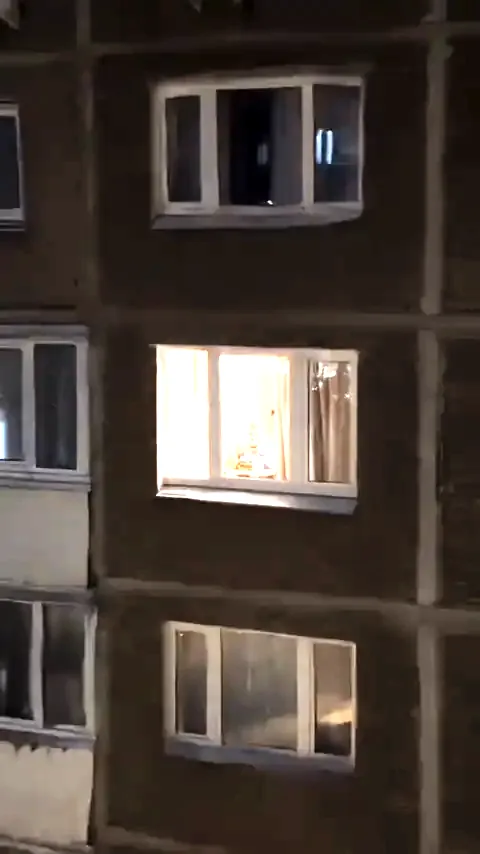
A diner paused mid-bite inside a warm apartment window at night
The prepared Window Peeper AI Night Window template.

See the Window Peeper template in motion

Play the original scene once. The approach, stare and curtain close are the visual contract behind every generated clip.

Make yours
0:00 / 0:00
Window Peeper Night WindowSource template

Why the Window Peeper AI scene is easy to recognize

The format strips the idea down to a window, a diner, a stare and a curtain.

A Window Peeper AI video depends on visual timing. The camera begins outside the building, gives the audience a dark facade and one warm opening, then moves closer until the person inside becomes the subject. The meal matters less than the interruption: the diner stops, looks up and acknowledges the lens.

That pause is the joke. It turns a quiet late-night snack into a staged caught-at-the-window moment. The beige curtain is the payoff because it ends the eye contact and closes the scene. The template keeps those beats in the same order instead of treating the window as a generic backdrop.

The result works for a person or a pet, and it remains a 9:16 social clip rather than a full production scene. Use your own photo or a photo you have permission to use. Do not upload restaurant branding, private material or another person's image without consent.

One clear face or pet face

A front-facing photo with even light gives the scene a readable subject. Sunglasses, masks and heavy filters make the stare less clear.

Original scene audio

The final video keeps the prepared scene soundtrack. You do not need to add dialogue or describe a sound design.

Native vertical frame

The 9:16 frame is part of the template. It keeps the window, diner and curtain in a social-ready composition.

No restaurant branding

The food props are generic. The product does not reproduce a restaurant logo, wrapper or a recognizable performer from the source clip.

Photo guidance for a clean window scene

The template supplies the scene. Your photo supplies the subject, so clarity matters more than a dramatic pose.

Use a recent, well-lit photo

Choose one person or pet with the face or eyes visible. The uploaded background and pose do not carry into the prepared apartment.

Keep the image appropriate

Use a photo you own or have permission to use. The scene is staged comedy, not a claim about a real neighbor or a real apartment.

Start at 720P

720P is the practical default for a 9:16 social clip. Use 480P for a composition check or 1080P when detail matters.

Choose a one-time credit pack

Packs start at $7.90. 480P uses 50 credits, 720P uses 100 and 1080P uses 200. No subscription.

Up to 2 Videos100 credits
$7.90

$7.90 per 720P video

100 credits: 1 video at 720P or 2 at 480P.

  • One-time purchase, no subscription
  • Technical failures refund unused credits automatically
  • 30 day validity
Up to 4 Videos200 credits
$14.90

$7.45 per 720P video

200 credits: 2 videos at 720P, 4 at 480P or 1 at 1080P.

  • One-time purchase, no subscription
  • Technical failures refund unused credits automatically
  • 30 day validity
Up to 10 Videos500 credits
$29.90

$5.98 per 720P video

500 credits: 5 videos at 720P, 10 at 480P or 2 at 1080P.

  • One-time purchase, no subscription
  • Technical failures refund unused credits automatically
  • 90 day validity
Up to 30 Videos1500 credits
$74.90

$4.99 per 720P video

1,500 credits: 15 videos at 720P, 30 at 480P or 7 at 1080P.

  • One-time purchase, no subscription
  • Technical failures refund unused credits automatically
  • 180 day validity

Every pack uses the same Window Peeper AI Night Window template. Compare credit packs.

What the Window Peeper AI video generator does

Window Peeper AI turns one clear photo into a prepared 14-second night-window clip. This Window Peeper video generator approaches a dark apartment facade, finds one warm-lit window, then settles on the person inside as they freeze mid-bite and look straight into the lens. The scene ends with a hand reaching for the beige curtain and pulling it closed.

The Window Peeper filter is usually shared as a short social clip, but Window Peeper AI gives the idea a direct workflow without a timeline or a CapCut project. Choose one photo, select a resolution and generate. The original window framing, slow approach, deadpan stare and curtain timing stay fixed, so every result follows the same visual beat.

The Window Peeper effect works best when the source photo is clear and evenly lit. One person or pet should be easy to identify, with both eyes visible and no heavy filter. Window Peeper AI can make a burger scene, a late-night snack moment or a pet-at-the-window version while keeping the same lit apartment and observational angle. The result is a 9:16 video that is ready for a feed crop without rebuilding the edit.

Searches for Window Peeper template and Window Peeper trend often point to reposted clips or an editing breakdown. Window Peeper AI keeps the product focused: one photo becomes one finished night-window scene. If you searched for Window Peeper CapCut template or a Window Peeper CapCut edit, this is a separate web generator with no project file to install and no editing steps to learn.

Open the Window Peeper AI video generator

Window Peeper AI questions, answered

What the template does, what to upload, how long the clip lasts and how credits work.

For an order, failed render or refund question, contact support@aiwindowpeeper.video.

Window Peeper AI is a focused one-photo video generator that places your chosen person or pet in a prepared 14-second apartment-window scene. The view closes in, the diner freezes mid-bite, stares into the lens and closes the curtain. The output is native 9:16.

Sign in, upload one clear photo, choose 480P, 720P or 1080P, and generate. The lit window, scene motion, audio and curtain-close timing are already built into the template. No timeline editing is required.

It is a web generator, not an in-camera TikTok filter and not a Window Peeper CapCut template. You do not install a project file or rebuild a Window Peeper CapCut edit. The site creates a fresh clip from your photo.

The effect includes the dark facade, one warm-lit window, a forward push-in, a diner eating at a small table, a mid-bite pause, a sustained direct stare and a beige curtain closing at the end.

One. Use a clear, well-lit photo with a readable face or, for a pet, visible eyes and markings. The source background, pose and lighting do not appear in the finished window scene.

Yes. A clear dog, cat or other pet photo works with the same preparation. Upload one image and the pet becomes the figure caught sneaking a snack by the window. Use a photo you have permission to use.

The format spread quickly through short social videos in October 2026. Reposts and template links move faster than reliable attribution, so this page does not claim to identify the first creator. It focuses on the repeatable caught-at-the-window scene.

The trend is discussed with Mr Bean comparisons because the original clip has a similar comedic stare. This site does not preserve that performer or likeness. Your uploaded photo becomes the person in the prepared scene, and no restaurant branding is reproduced.

One-time packs start at $7.90 for 100 credits. A 480P render uses 50 credits, 720P uses 100 and 1080P uses 200. There is no subscription. The current cost is displayed before you submit.

No. The template can be watched before buying. Generation uses paid credits, and there is no free generation tier. The preview shows the exact scene, motion and timing before you choose a pack.

If a task fails for a technical reason, unused credits are refunded automatically. If the finished video clearly does not match the prepared template because of a quality incident, contact support for refund review. Completed videos are not refunded for personal preference.

Photos are used only to create your video, are not used for model training and are scheduled for deletion within 30 days. You can contact support to request earlier deletion.

Make your Window Peeper AI video

Bring one photo. Keep the lit window, push-in, stare and curtain timing ready to render.

Create Video